VATFLOW · Staff briefing
FCA How-To
One path from creating a Flow Constrained Area to issuing ground releases. Follow the numbers.
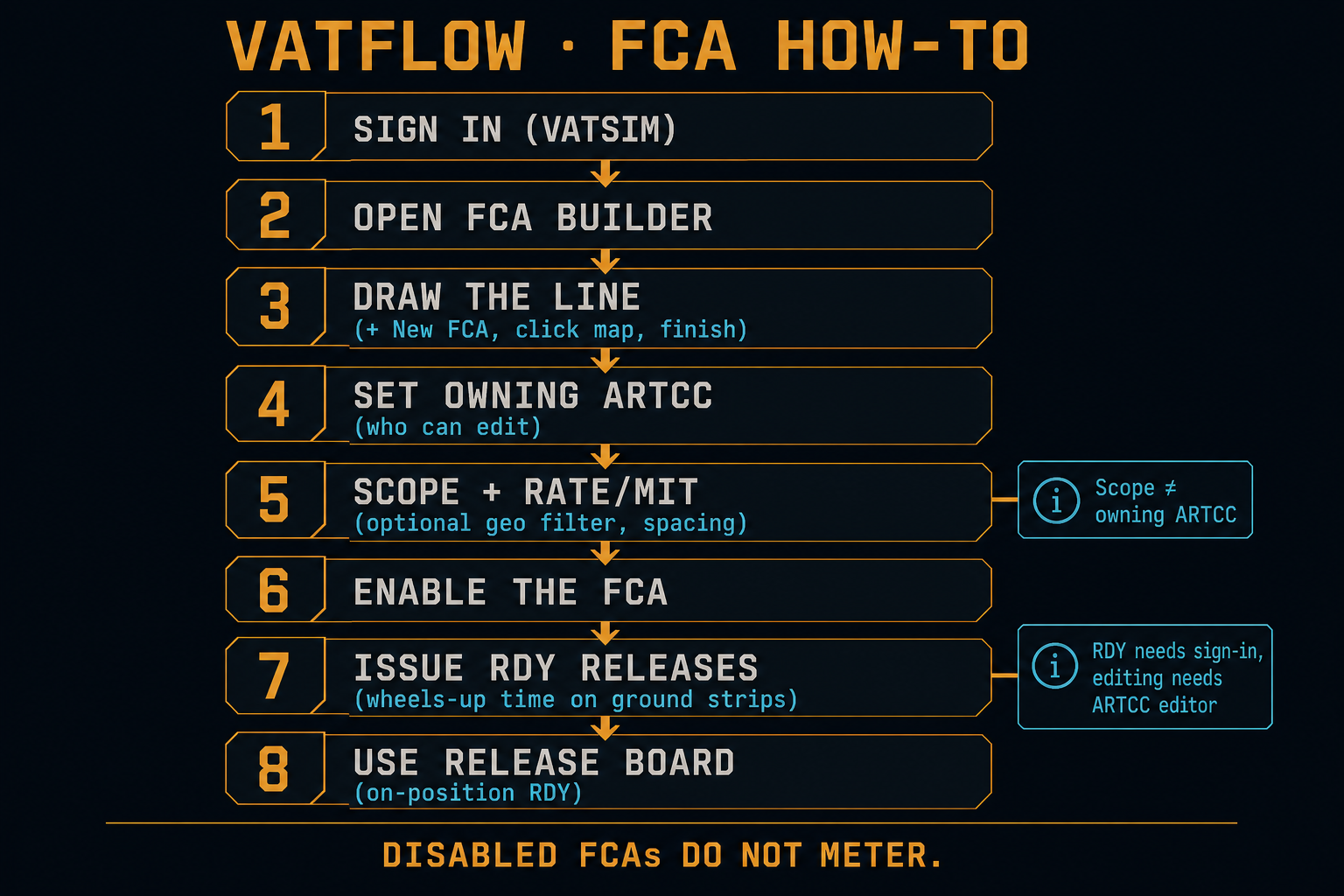
Sign in with VATSIM. Anyone signed in can press RDY. Creating or editing an FCA needs ARTCC editor access for that facility.
-
1
Open FCA Builder
Use the top nav → FCA Builder. This is where programs are drawn and enabled.
Tool · FCA Builder -
2
Create the FCA
Click + New FCA. Click the map to place points (at least 2). Double-click or press Enter to finish. Esc cancels.
Action · Draw the metering line -
3
Set owning ARTCC
Tag the facility that owns this program (e.g. ZDC). Scoped editors can only edit FCAs for their ARTCC.
Required · Access control -
4
Scope, rate / MIT, filters
Scope (optional) = aircraft must be inside listed ARTCC(s) to be metered. Separate from owning ARTCC.
Settings · Who gets metered & how tight
Set Rate (aircraft/hour) and/or MIT, plus dest/origin/fix/FL filters so the right traffic is included. -
5
Enable the FCA
Turn it on when ready. Disabled FCAs do not meter. Aircraft only join when their filed route crosses the line.
Optional Record crossings freezes each match’s first profile ETA and logs the actual line crossing with no RDY. Leave the FCA enabled and review planned vs actual on FCA Accuracy — rows build up on their own over days and weeks.
Go live · Sequencing starts -
6
Work the sequence
Select the FCA → sequence panel. Airborne = nearest to the line first. Ground strips show proposed release spacing. Drag to reorder if you can edit.
Panel · Order & gaps -
7
Issue releases (RDY)
Press RDY on a ground departure to freeze a wheels-up time. Optional HHMMz floor = release at or after that time. Press again (RLSD ✕) to cancel. Prefer IDST for on-position CFR (tower / APP / center filters). You can also RDY from Builder.
Same release · every page -
8
On position → pick a release page
Open IDST or FCA Overview strips for RDY. Build/edit programs stays in FCA Builder.
Tools · IDST · FCA Overview
Owning ARTCC = who may edit the program.
Scope = optional geographic filter for which aircraft are metered.
Issue releases
Issue RDY from IDST once an FCA is enabled. Same program, same sequence, same times — everywhere.
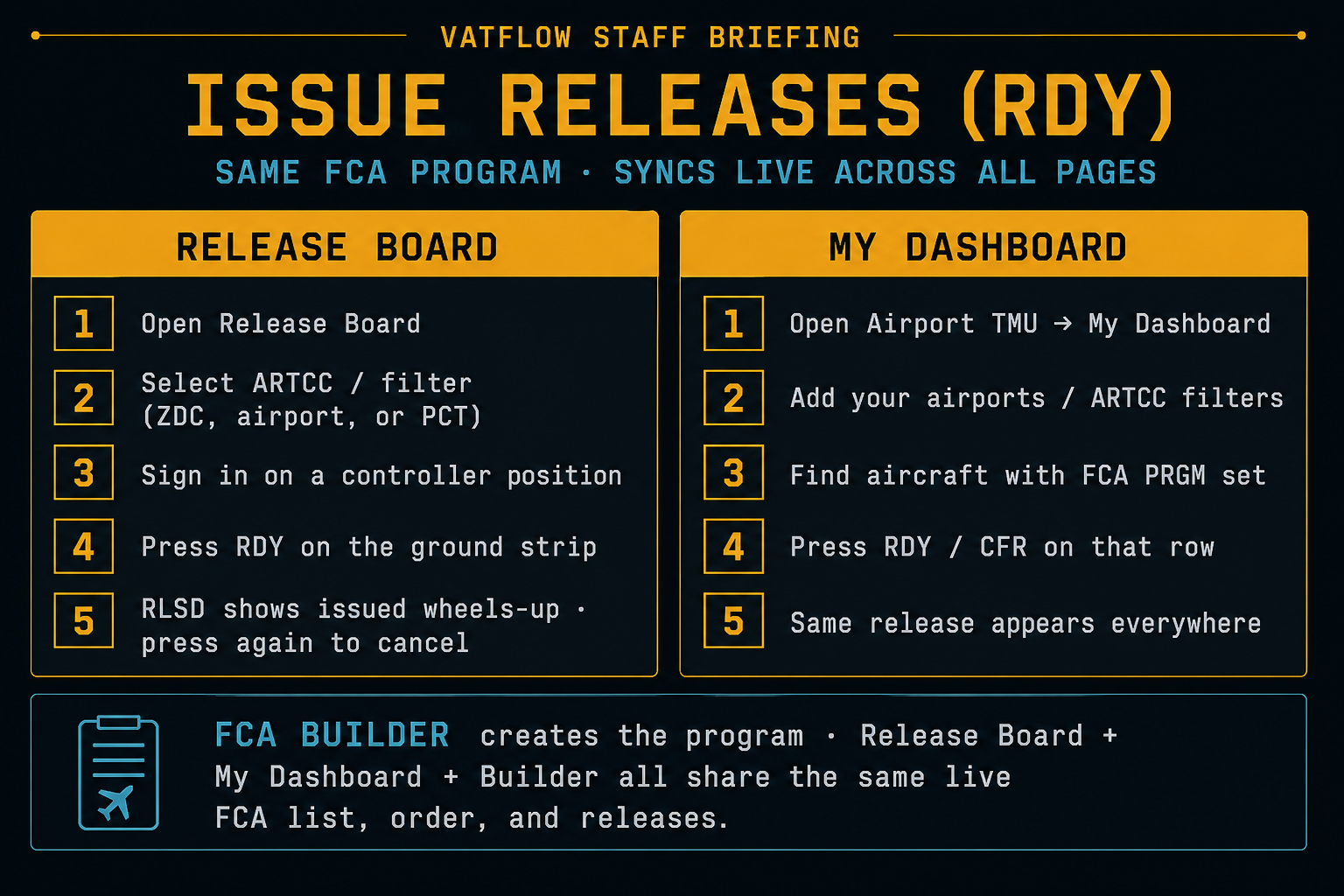
FCA Builder, IDST, and FCA Overview share one live FCA list — order, RDY / RLSD times, and cancels update for everyone in realtime. Create and edit the line in FCA Builder; issue releases from IDST. Airport TMU does not issue a time.
IDST
- Open IDST
- Add airport / approach / ARTCC filters for what you are working
- Sign in while online on a controller position
- Select a flight → press RDY (optional ART HHMMz)
- Released = issued wheels-up · cancel to return to Unscheduled
FCA Overview
- Open FCA Overview
- Select the ARTCC that owns the program
- Find the ground strip in that FCA’s stack
- Press RDY / SET (HHMMz) when signed in
- Same release shows on Builder + IDST
Which tool?
- FCA Builder — draw, configure, enable programs · Open
- IDST — on-position CFR / RDY · Open
- FCA Overview — ARTCC map + strips · Open
- FCA Accuracy — planned vs actual crossing times for recorded lines · Open
- Airport TMU — destination AAR / MIT / recommended delay (info only; does not issue a time) · Open